Oracle ADB APEX workload: connecting
- Written by: ilmarkerm
- Category: Blog entry
- Published: April 11, 2026
I currently have a customer who wishes to move their internal APEX application into a cloud based hosting, with quite tight budget constraints – and at the same time still need to treat it as production service.
After comparing many options, none which were perfect, the option that we are going for is Oracle Autonomous database APEX workload type. It is significantly cheaper than the full blown Autonomous Database, but it does come with its own quite unique challenges that we need to overcome. APEX service limitations are documented here
The main limitation – there is no connectivity via SQL*Net, all interactions must be done over HTTPS. Everything, including development of database application and deployments.
Side-effect of this restriction is also that there is no-way to have a custom URL (vanity URL) for your application that would also support APEX social login feature (OAuth/OpenID). To overcome that limitation in a full Autonomous Database installation, people usually deploy their own ORDS in front of the Oracle cloud database service. This solution is not usable here.
I will write a few blog posts, on how to work within the restrictions of the APEX workload type database and still keep most of the developer comforts.
Connecting to the database
To work with the database schema you are mainly expected to use the built in APEX SQL workspace and Database Actions SQL Developer web. Mostly enough, but I think we all prefer using our own preferred database clients. Also it is not possible to automate tasks and deploys via the web page.
A few years ago Oracle introduced REST JDBC driver that talks to the database over ORDS SQL endpoint, via HTTP protocol. This ORDS endpoint is accessible, so lets try using it.
The REST JDBC driver does come with restrictions, the main one being that the driver is stateless and does not support transactions. You can read about the driver and its restrictions here
Create ORDS enabled schema
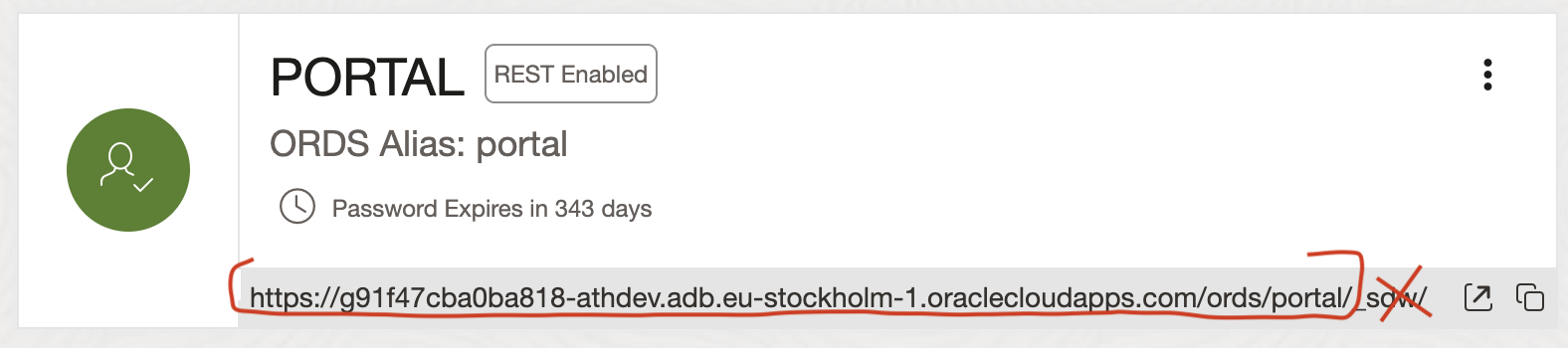
Open Autonomous AI Database and go to Tool configuration. There you see Web access (ORDS) and open its Public access URL. Open SQL Developer web and log in as ADMIN.
Open Administration > Database users and enable schema you want to log in as REST enabled. And copy the REST URL for this schema, minus the last _sdw/ part.
SQLcl
It is possible to connect to the ORDS SQL endpoint using SQLcl, Jeff Smith blogged about it here. Although not all SQLcl functions are available. For example Liquibase and connection manager are not available.
Here I’m using SQLcl 26.1.
- Start SQLcl with /nolog flag
- CONNECT schemaname@RESTUrl
- Or CONNECT schemaname/password@RESTUrl
ilmarkerm@Ilmars-iMac bin % ./sql /nolog

SQLcl: Release 26.1 Production on Sat Apr 11 09:21:40 2026

Copyright (c) 1982, 2026, Oracle.  All rights reserved.

SQL> connect portal@https://g91f47cba0ba818-athdev.adb.eu-stockholm-1.oraclecloudapps.com/ords/portal/
Password? (**********?) **********************
Connected.

SQL> select user, sys_context('userenv','instance_name');

USER      SYS_CONTEXT('USERENV','INSTANCE_NAME')
_________ _________________________________________
PORTAL    fcehldyf3
I can execute usual SQL commands.
SQL> create table t (id number);

Table T created.

SQL> insert into t (id) values (1);

1 row inserted.

SQL> select * from t;

   ID
_____
    1

SQL> begin
  2    for i in 1..100000 loop
  3      insert into t (id) values (i);
  4    end loop;
  5  end;
  6* /

PL/SQL procedure successfully completed.

SQL> select count(*) from t;

   COUNT(*)
___________
     100001

SQL> truncate table t;

Table T truncated.
But the REST driver is stateless, so no transactions (between different calls – inside the same call they work).
SQL> insert into t (id) values (2000000002);

1 row inserted.

SQL> rollback;

Rollback complete.

SQL> select * from t;

           ID
_____________
   2000000002

SQL> begin
  2  insert into t (id) values (30000003);
  3  rollback;
  4  end;
  5* /

PL/SQL procedure successfully completed.

SQL> select * from t;

           ID
_____________
   2000000002
You cannot use SQLcl connection manager for saving the connections.
SQL> conn -save portaldev portal@https://g91f47cba0ba818-athdev.adb.eu-stockholm-1.oraclecloudapps.com/ords/portal/
Connections of type OREST are not supported for saving
Warning: You are no longer connected to ORACLE.
Also built in Liquibase commands give a NullPointer.
SQL> lb generate-changelog
Null Pointer please log a bug.
liquibase.exception.CommandExecutionException: Cannot invoke "String.toUpperCase()" because the return value of "java.sql.DatabaseMetaData.getSQLKeywords()" is null
GUI
I haven’t been successful at connecting DBeaver nor SQL Developer using the Oracle REST driver. DBeaver just gives a lot of internal JDBC errors even if I strip it down to bare minimum of supported features.
java.lang.NullPointerException: Cannot invoke "java.sql.Statement.execute(String)" because the return value of "org.jkiss.dbeaver.model.impl.jdbc.exec.JDBCStatementImpl.getOriginal()" is nullI’ll leave it like that.