Category: Blog entry
- Written by: ilmarkerm
- Category: Blog entry
- Published: October 5, 2022
Oracle recently released a thin driver for Python, meaning it does not require any Oracle client installation (like cx_Oracle does) and it is written natively in Python – one benefit of which is that it works on all platforms where Python is present, including ARM64.
You can read more about it here: https://levelup.gitconnected.com/open-source-python-thin-driver-for-oracle-database-e82aac7ecf5a
Interestingly it is not yet trivial to find examples, on how to use the new thin driver to connect to Oracle Autonomous Database.
By default Autonomous database requites mTLS connections, so first create and download the Instance wallet for your Autonomous database (zip file), do remember the password you set. Unzip and transfer ewallet.pem and tnsnames.ora to your Python host.
# Create directory for wallet files
$ mkdir wallet
$ pwd
/home/ilmar/wallet

# Transport ewallet.pem and tnsnames.ora to that directory
$ ls /home/ilmar/wallet/
ewallet.pem
tnsnames.ora
If you have not yet done so, install the pythoin thin driver.
$ pip3.9 install --user oracledb
Collecting oracledb
  Downloading oracledb-1.1.1-cp39-cp39-manylinux_2_17_aarch64.manylinux2014_aarch64.whl (6.7 MB)
     |████████████████████████████████| 6.7 MB 24.1 MB/s
Collecting cryptography>=3.2.1
  Downloading cryptography-38.0.1-cp36-abi3-manylinux_2_17_aarch64.manylinux2014_aarch64.manylinux_2_24_aarch64.whl (3.7 MB)
     |████████████████████████████████| 3.7 MB 34.9 MB/s
Collecting cffi>=1.12
  Downloading cffi-1.15.1-cp39-cp39-manylinux_2_17_aarch64.manylinux2014_aarch64.whl (448 kB)
     |████████████████████████████████| 448 kB 90.9 MB/s
Collecting pycparser
  Downloading pycparser-2.21-py2.py3-none-any.whl (118 kB)
     |████████████████████████████████| 118 kB 119.8 MB/s
Installing collected packages: pycparser, cffi, cryptography, oracledb
Successfully installed cffi-1.15.1 cryptography-38.0.1 oracledb-1.1.1 pycparser-2.21
Connect from Python code to Autonomous database, connect.py
import oracledb, os

db = oracledb.connect(
       user=os.environ['ORACLE_USER'],
       password=os.environ['ORACLE_PASSWORD'],
       dsn=os.environ['ORACLE_TNS'],
       config_dir="/home/ilmar/wallet",
       wallet_location="/home/ilmar/wallet",
       wallet_password="wallet_password_here")

with db.cursor() as c:
    for row in c.execute("SELECT owner, object_name FROM all_objects FETCH FIRST 10 ROWS ONLY"):
        print(row)

db.close()
Execute
export ORACLE_USER=my_database_username
export ORACLE_PASSWORD=my_database_password
export ORACLE_TNS=connection_identifier_from_tnsnames.ora

$ python3.9 connect.py
('SYS', 'ORA$BASE')
('SYS', 'DUAL')
('PUBLIC', 'DUAL')
('PUBLIC', 'MAP_OBJECT')
('SYS', 'SYSTEM_PRIVILEGE_MAP')
('SYS', 'I_SYSTEM_PRIVILEGE_MAP')
('PUBLIC', 'SYSTEM_PRIVILEGE_MAP')
('SYS', 'TABLE_PRIVILEGE_MAP')
('SYS', 'I_TABLE_PRIVILEGE_MAP')
('PUBLIC', 'TABLE_PRIVILEGE_MAP')
Here I used Oracle Linux 8 sever running on Ampere (ARM64) in Oracle Cloud Always Free Tier. No Oracle database client or Instantclient was installed.
- Written by: ilmarkerm
- Category: Blog entry
- Published: September 28, 2022
Lets say your company has an automated system that propagates and renews TLS certificates for each server automatically, for example using NDES. And you want to use the same files also for your Oracle database TCPS protocol connections.
For Oracle database the database server user certificate needs to be placed inside Oracle wallet and the default workflow for Oracle wallet is that you create the private key and certificate request inside Oracle wallet and then use the exported certificate request to request a certificate from your certificate authority and then you import that certificate to the wallet.
But you have already issued certificate and private key as separate files, like many popular open source tools like it. It is possible to create Oracle wallet from these.
We have two files.
- Private key – /etc/pki/tls/private/servername.key
- Issued certificate – /etc/pki/tls/private/servername.crt
We also need the certificate authority certificates (all of them, the full chain) who issued your server certificate. You can usually download them from your CA webpage or there also might be URL embedded in the certificate itself.
I’m using orapki executable from 19c installation.
First create an empty Oracle wallet.
# orapki wallet create -wallet /oracle/wallet/location -pwd oracle_wallet_passwordThen add all the certificate authority certificates to the wallet
# You can check the certificate if it has links to issuer server certificates embedded. You need to repeat that until there is no output (you have reached the root) and download each file along the way. Usually there are about 2-3 of them.
# openssl x509 -in /etc/pki/tls/private/servername.crt -inform pem -noout -issuer -ext authorityInfoAccess


# orapki wallet add -wallet /oracle/wallet/location -pwd oracle_wallet_password -trusted_cert -cert /tmp/ca_certificate_intermediate.cer
# orapki wallet add -wallet /oracle/wallet/location -pwd oracle_wallet_password -trusted_cert -cert /tmp/ca_certificate_root.cer
A quick sanity check, the server certificate you have should have TLS Web Server Authentication extended key usage set. If it is not, ask your CA to reissue the certificate. Without it your clients might get an error like this: IO error: extended key usage does not permit use for TLS server authentication
# openssl x509 -ext extendedKeyUsage -in /etc/pki/tls/private/servername.crt -noout
X509v3 Extended Key Usage:
    TLS Web Client Authentication, TLS Web Server Authentication
If the private key is unencrypted, then you first need to encrypt it in PKCS#8 format – into a separate temporary file. oraplki cannot import unencrypted private key.
# Check first, if the key in unencrypted
# head -1 /etc/pki/tls/private/servername.key
-----BEGIN PRIVATE KEY-----

# export wallet_build_pass="long_key_encryption_password"
# openssl pkcs8 -topk8 -in /etc/pki/tls/private/servername.key -out /tmp/encrypted.key -passout env:wallet_build_pass

# Lets check that the resulting file has encrypted key
# # head -1 /tmp/encrypted.key
-----BEGIN ENCRYPTED PRIVATE KEY-----
Now you can import the private key and certificate into Oracle wallet.
# orapki wallet import_private_key -wallet /oracle/wallet/location -pwd oracle_wallet_password -pvtkeyfile /tmp/encrypted.key -pvtkeypwd long_key_encryption_password -cert /etc/pki/tls/private/servername.crtCode – to automatically renew Oracle wallet. NB! read and modify the code according to your needs.
- Written by: ilmarkerm
- Category: Blog entry
- Published: May 30, 2022
In Oracle Autonomous database one major application feature is missing – Flashback Data Archive. Purpose of that feature was archiving all data changes seamlessly to the application, no old-school trigger-based data archival/auditing needed. One major disadvantage of triggers is that end user session needs to wait for the trigger to execute, they become part of the end user transaction. FDA lets the users just declare for how long all changes need to be retained (even years) and it collected the data to be archived in the background, from UNDO data. It also had the possibility to add context from the user session that made the data change. Although FDA has been quite troublesome/buggy component, I’ve always liked its functionality.
FDA is part of all Oracle Database editions – except Oracle Autonomous Database. Reference
I currently do not see any other possibility than to go back to old-trigger based solutions, but how to make it as easy to maintain as possible? And keep the modification context.
Traditional way using triggers is to store :OLD (and :NEW ?) values in a separate table, while having a separate audit table for each source table. But these kinds of triggers need to be recreated (and history tables maintained also) whenever the source table structure changes. Sadly there is no way to serialize :OLD/:NEW or access them in any dynamic way.
There are ready made packages for implementing this style of auditing, for example this one by Connor McDonald.
I decided to create my own to make the maintenance much simpler. Store everything as JSON, and store only the new row version.
- It is very easy to generate JSON object from a table row
- I would argue, that there is no need to record :OLD row in the history, if :NEW is always recorded. And since every history record has a context attached, it makes more logical sense to me that you store the session context together with the :NEW row version – that this person changed the row to this new version. Not that this person removed that :OLD row version.
- Changes to source table do not require any changes to triggers nor the history table.
- Yes, JSON wastes more diskspace.
- It is very easy to query JSON as relational data in Oracle.
- Currently the code expects each table has a primary key named ID. I’m not going to change it to make it more generic, you are welcome to change the code for yourself 🙂 As always, don’t take the code blindly from the internet, understand it before you use it.
- Written by: ilmarkerm
- Category: Blog entry
- Published: August 31, 2021
I’ve been using InfluxDB for storing metrics, but it has hit its limitations – pretty huge memory consumption, so can’t really store some metrics for longer time and InfluxQL language itself is very limiting for analytics. So looking now into replacing it with Oracle 21c with JSON in-memory store and other goodies.
But InfluxDB has a nice GROUP BY time(<time interval>) clause that lets you group timestamps into arbitary length time groups – 1 minute, 2 minute, 5 minute, 15 minute, 3 hours…
In Oracle you can use built in TRUNC() or ROUND() to round timestamp into 1 MINUTE, 1 HOUR, 1 DAY, but not to 5 minute and so on.
Here are my functions to fix this issue.
Yes you are seeing correct, all TIMESTAMP data types. No DATE. Please stop using this old expired DATE data type. TIMESTAMPS are better as ISO joins are better 🙂
- Written by: ilmarkerm
- Category: Blog entry
- Published: January 17, 2021
I wanted to share some of the Grafana dashboards I’ve built recently to monitor Oracle database environments. Images for now, for your inspiration, so you could build your own.
First up is Oracle database listener. Listener log is a very valuable source of information, that I think is often overlooked. For example just from monitoring listener logs you can get real time information if clients can connect to the database successfully or they get some error. Or so some specific client get an error only (misconfigured client), or some forgotten app is still running is hammering the listener with service name that does not exist anymore. Maybe some client is misbehaving and is trying to connect hundreds of times per second to the database, you will see it from the listener log, with the client information. Who are the clients still connecting with TCP and have not yet migrated over to TCPS connections like DBA-s are demanding? And so on.
And from grafana you can also generate alerts.
Here is the current state of my listener dashboard (this one is for human operators to drill down into issues, I have another dashboard for automatic alerts).
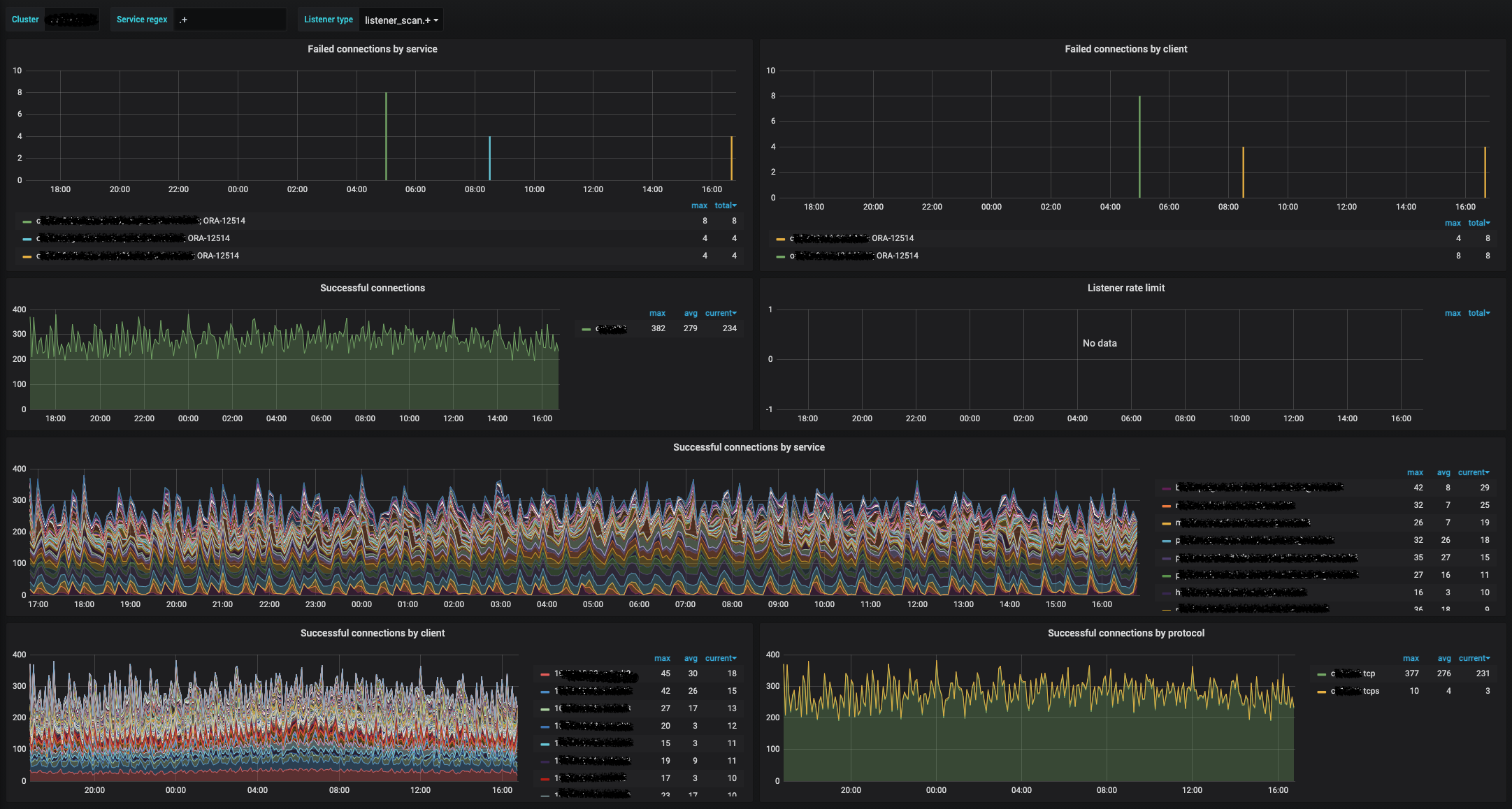
Data collector was published earlier:
Some InfluxQL queries behind these panels:
I think “Failed connections by service” is a very good metric to create an alert on.